For background info on tenant restrictions, check out my previous post.
Cloud Identity Service
Taking a look in Event Viewer, there’s a new log Microsoft-Windows-TenantRestrictions/Operational with some events:
1004: The endpoint sync service (cloudidsvc) started succesfully [sic].
1005: The endpoint sync service (cloudidsvc) succesfully [sic] synced the latest list of endpoints.
That service has an interesting description:
Supports integrations with Microsoft cloud identity services. If disabled, tenant restrictions will not be enforced properly.
The service is implemented in System32\cloudidsvc.dll, and determines which hosts should receive the TRv2 headers if TRv2 is configured. It discovers hostnames via the Office 365 IP Address and URL web service, then adds a built-in list (below) and any GPO-defined hostnames or IPs.
- login.live.com
- login.microsoft.com
- login.microsoftonline.com
- login.windows.net
- login.microsoftonline.us
- login.microsoftonline.de
- login.chinacloudapi.cn
- *.live.com
- *.microsoft.com
- *.office.com
It also registers a WNF subscription to system Group Policy updates (WNF_GPOL_SYSTEM_CHANGES), to update the host list if the TRv2 policy changes.
Tenant Restrictions Plugin
cloudidsvc doesn’t actually inject the Sec-Restrict-Tenant-Access-Policy header though. On a hunch, I had a quick look in System32 for any interesting files. Surprisingly there’s a new TenantRestrictionsPlugin.dll - maybe this will have more details.
This time it’s a DllMain library. It has some references to WinHTTP plugin state though, and some interesting exports: GetTenantRestrictionsHostnames, HttpPolicyExtensionInit, and HttpPolicyExtensionShutdown. GetTenantRestrictionsHostnames is pretty self explanatory, it just loads hostnames from cloudidsvc’s cache in the registry.
HttpPolicyExtensionInit might be related to the header injection we observed previously. It starts by checking if cloudidsvc is running and starting it if needed, then calls HttpPolicyExtensionInitWinHttp or HttpPolicyExtensionInitWinInet depending on a flag argument. It also sets up a PluginStateManager, that will rerun these init functions later via an OnPolicyChange event handler.
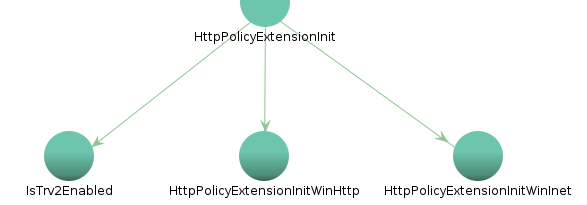
The init functions are the real core of TRv2. We’ll start with HttpPolicyExtensionInitWinHttp which sets the 0xa3 WinHTTP option and registers a WinHttpGlobalCallback function. This appears to intercept WinHTTP requests for modification, but the only documentation I could find was an ERROR_WINHTTP_GLOBAL_CALLBACK_FAILED definition in winhttp.h. Such an API could be extremely powerful, and WinHttpSetOption has been used by malware, so I tried to call it in a test C++ binary.
Unfortunately dwBufferLength=sizeof(&callback) of resulted in ERROR_INSUFFICIENT_BUFFER. After some trial and error, dwBufferLength=40 induced a delay of several seconds, then an NT STATUS_ACCESS_VIOLATION. Any larger buffers would result in the same ERROR_INSUFFICIENT_BUFFER, so I’m really not sure of the root cause here. Given this was my first time writing C++, I hope someone more knowledgable can research this avenue further.
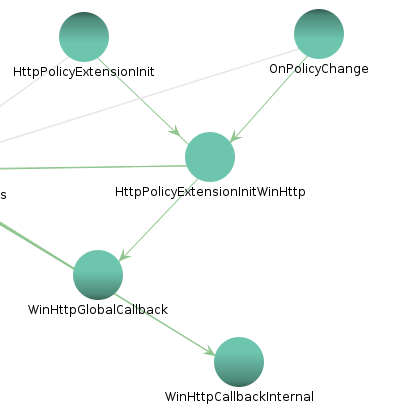
Digging deeper into WinHttpGlobalCallback confirms my suspicions. It’s responsible for setting Sec-Restrict-Tenant-Access-Policy, and HttpPolicyExtensionInitWinInet implements a similar feature for WinINet requests via another undocumented 0xbc WinINet option. There’s also an ERROR_INTERNET_GLOBAL_CALLBACK_FAILED definition in wininet.h. Testing it via C++ didn’t fare much better than WinHTTP, exhibiting the same strange NT buffer behaviour. I also tried running as SYSTEM or other services via PsExec, and using a sandbox to avoid antivirus issues, but with no success.
The final export is HttpPolicyExtensionShutdown, which has a similar WinHTTP and WinINet code flow for clearing their respective callbacks.
WDAC and Windows Firewall
So far, we’ve discovered how the M365 hosts are determined, and how the header is injected to enforce a tenant’s restriction policy. But there’s one last feature that’s missing - “Enable firewall protection of Microsoft endpoints”. The group policy description mentioned a WDAC policy, tagging, and Windows Firewall.
I was immediately suspicious of WDAC AppId tagging, a special type of WDAC policy for tagging processes with a configurable ID. Implementation docs were released a few months ago, but without any actual usecases. Fortunately the debugging doc provides an example tag POLICYAPPID://MyKey, so we at least have a prefix to search for.
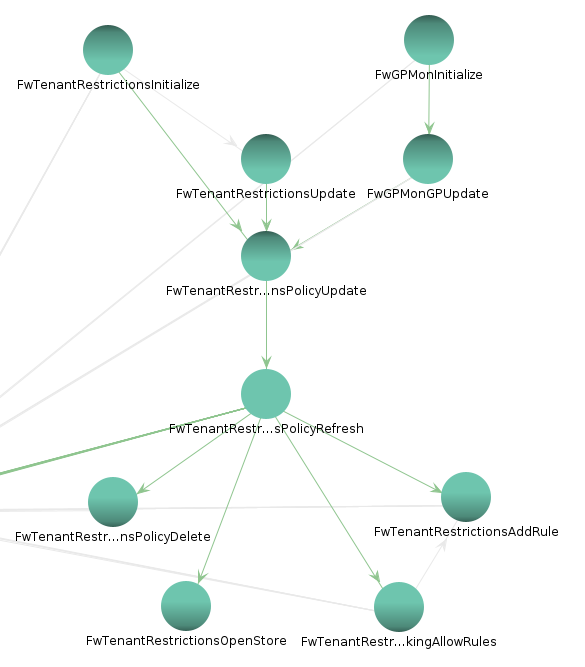
Sure enough, System32\mpssvc.dll contains this one-liner: O:SYG:SYD:(XA;;0x1;;;WD;(Exists POLICYAPPID://M365ResourceAccessEnforcement)). Static analysis shows it’s used in FwTenantRestrictionsPolicyRefresh, and in fact there’s a whole series of FwTenantRestrictions* functions:
- AddCoreNetworkingAllowRules
- AddRule
- CompareSubnetHlpr
- Initialize
AddCoreNetworkingAllowRules implements a set of firewall rules to allow core protocols (eg DHCP, ICMP) and non-M365 traffic. But the most interesting rule uses AddRule to block traffic to M365 endpoints, unless the source process has the M365ResourceAccessEnforcement WDAC tag. This could be pretty useful to mitigate unapproved apps or app consent phishing, especially if complete application control isn’t feasible (WDAC/AppLocker). I did a quick demo with an approved corporate browser (Edge) alongside an unapproved browser (Chrome):

That’s all I have for this feature, I hope you enjoyed.
Non-Tenant Restrictions Policy Allow Rule
This rule allows traffic to endpoints which are not policy defined M365 endpoints
Tenant Restrictions - Loopback Allow Rule
This rule allows loopback traffic
FwTenantRestrictionsAddCoreNetworkingAllowRules(store,isDomainJoined,isDirectAccessConfigured);
“This rule allows traffic for core networking services”
Tenant Restrictions Core Networking Allow Rule - NLAsvc
%SystemRoot%\system32\svchost.exe
nlasvc
Tenant Restrictions Core Networking Allow Rule - DnsCache
Dnscache
Tenant Restrictions Core Networking Allow Rule - DHCP
%SystemRoot%\system32\svchost.exe
Dhcp
Tenant Restrictions Core Networking Allow Rule - ICMPv6
Tenant Restrictions Core Networking Allow Rule - ICMPv4
Tenant Restrictions Core Networking Allow Rule - IGMP
Tenant Restrictions Core Networking Allow Rule - LSASS
%SystemRoot%\system32\lsass.exe
Tenant Restrictions Core Networking Allow Rule - LDAP
Process Explorer shows the service loading System32\cloudidsvc.dll, so let’s fire up Ghidra and take a look. We can follow the ServiceMain entrypoint through service initialisation to InitializeTenantRestrictionsUpdates. State is initialised with a call to OnPolicyChange, which checks IsTrv2Enabled by the existence of HKLM:\SOFTWARE\\Policies\\Microsoft\\Windows\\TenantRestrictions\\Payload, then loads cloudid, tenantid, and policyid from the corresponding subkeys. The validation for these GUIDs is pretty clever, using COM’s CLSIDFromString. It also registers a WNF subscription to system Group Policy updates (WNF_GPOL_SYSTEM_CHANGES), likely to trigger OnPolicyChange.
Now control flows to the core of cloudidsvc. CreateTimerQueueTimer sets up a callback to UpdateTenantRestrictionsList at a random interval via UpdateTenantRestrictionsListTimerRoutine. It implements a WinHTTP client for the Office 365 IP Address and URL web service, and builds a registry cache for the data. The service requires a request GUID, and the data is versioned so the client only requests data if a new version is detected.
guid = GetO365Guid() // uses Win32 CoCreateGuid
currentVersion = GetTenantRestrictionsVersion() // read TenantRestrictionsVersion from cache
latestVersion = GetLatestTenantRestrictionsVersion()

GetLatestTenantRestrictionsVersion() {
	data = GetTenantRestrictionsO365ApiData("/version", guid)
	data.find(e => e.instance == cloudid)
	return data.latest
}

GetTenantRestrictionsO365ApiData(path, path2, guid) {
	if (path2) {
		path += "/" + path2
	}
	return WinHttp("endpoints.office.com"+path+"?ClientRequestId="+guid, "TenantRestrictions")
}
GET https://endpoints.office.com/version?ClientRequestId=00000000-0000-0000-0000-000000000000[
{
"instance": "Worldwide",
"serviceArea": "O365Default",
"latest": "2022092900"
},
{
"instance": "USGovDoD",
"serviceArea": "O365Default",
"latest": "2022092900"
},
{
"instance": "USGovGCCHigh",
"serviceArea": "O365Default",
"latest": "2022092900"
},
{
"instance": "China",
"serviceArea": "O365Default",
"latest": "2022072800"
},
{
"instance": "Germany",
"serviceArea": "O365Default",
"latest": "2022012800"
}
]If a new version is detected, it retrieves the latest endpoints.
if (currentVersion != latestVersion) {
	raw = GetTenantRestrictionsO365ApiData("/endpoints", cloudid, guid)
}
GET https://endpoints.office.com/endpoints/Worldwide?ClientRequestId=00000000-0000-0000-0000-000000000000[
...
{
"id": 8,
"serviceArea": "Exchange",
"serviceAreaDisplayName": "Exchange Online",
"urls": [
"*.outlook.com"
],
"tcpPorts": "80,443",
"expressRoute": false,
"category": "Default",
"required": true
}
...
]Then parses them, and adds some hardcoded InBoxEndpoints too. It also publishes a unique WNF_TR_UPDATED_ENDPOINTS event that was a Googlewhack before this post went live. The description is pretty self-explanatory: “Alert consumers that there are new Tenant Restriction endpoints”.
	data = ParseTenantRestrictionsHostnameAndIPData(raw)
	data.Hostnames += "login.live.com", "login.microsoft.com", "login.microsoftonline.com", "login.windows.net", "login.microsoftonline.us", "login.microsoftonline.de", "login.chinacloudapi.cn"
	data.SubdomainSupportedHostnames += ".live.com", ".microsoft.com", ".office.com"
	FlushTenantRestrictionsDataToRegistry(data, version)
	RtlPublishWnfStateData(0x41c61c39a3bc0875)
}

FlushTenantRestrictionsDataToRegistry(data, version) {
	key = "HKLM:\SOFTWARE\Microsoft\Windows\TenantRestrictions\TenantRestrictionsList"
	RegSetValueExW(key, "Hostnames", data.Hostnames)
	RegSetValueExW(key, "SubdomainSupportedHostnames", data.SubdomainSupportedHostnames)
	RegSetValueExW(key, "IPRanges", data.IPRanges)
	RegSetValueExW(key, "TenantRestrictionsVersion", version)
}
Tenant Restrictions Plugin
It seems like cloudidsvc can determine which endpoints to restrict, but doesn’t actually inject the Sec-Restrict-Tenant-Access-Policy header. On a hunch, I had a quick check in System32 for any interesting files. Surprisingly there’s a new TenantRestrictionsPlugin.dll - maybe this will have more details.
This one implements DllMain and seems like a more traditional library, just setting up kernel and ETW logging when initialised. It has some references to WinHTTP plugin state though, and some interesting exports: GetTenantRestrictionsHostnames, HttpPolicyExtensionInit, and HttpPolicyExtensionShutdown.
GetTenantRestrictionsHostnames is pretty self explanatory. It loads Hostnames and SubdomainSupportedHostnames from the cloudidsvc subkeys under HKLM:\\SOFTWARE\\Microsoft\\Windows\\TenantRestrictions\\TenantRestrictionsList, and it also loads any GPO-defined hostnames from the subkeys under HKLM:\\SOFTWARE\\Policies\\Microsoft\\Windows\\TenantRestrictions\\Payload.
HttpPolicyExtensionInit might be related to the header injection we observed previously, and accepts a flag for whether to use WinHTTP or WinInet. It starts off by checking if cloudidsvc is running and starting it if needed. Then reuses the same IsTrv2Enabled registry key check from cloudidsvc, and calls HttpPolicyExtensionInitWinHttp or HttpPolicyExtensionInitWinInet depending on the flag argument. It also sets up a PluginStateManager, that will rerun these init functions later via an OnPolicyChange event handler.
The init functions are the real core of TRv2. We’ll start with HttpPolicyExtensionInitWinHttp which sets the 0xa3 WinHTTP option and registers a WinHttpGlobalCallback function. This appears to intercept WinHTTP requests for modification, but the only documentation I could find was an ERROR_WINHTTP_GLOBAL_CALLBACK_FAILED definition in winhttp.h. Such an API could be extremely powerful, and WinHttpSetOption has been used by malware, so I tried to call it in a test C++ binary.
Unfortunately dwBufferLength=sizeof(&callback) of resulted in ERROR_INSUFFICIENT_BUFFER. After some trial and error, dwBufferLength=40 induced a delay of several seconds, then an NT STATUS_ACCESS_VIOLATION. Any larger buffers would result in the same ERROR_INSUFFICIENT_BUFFER, so I’m really not sure of the root cause here. Given this was my first time writing C++, I hope someone more knowledgable can research this avenue further.
Digging deeper into WinHttpGlobalCallback confirms my suspicions. It’s responsible for setting Sec-Restrict-Tenant-Access-Policy, and HttpPolicyExtensionInitWinInet implements a similar feature for WinINet requests via another undocumented 0xbc WinINet option. There’s also an ERROR_INTERNET_GLOBAL_CALLBACK_FAILED definition in wininet.h. Testing it via C++ didn’t fare much better than WinHTTP, exhibiting the same strange NT buffer behaviour. I also tried running as SYSTEM or other services via PsExec, and using a sandbox to avoid antivirus issues, but with no success.
The final export is HttpPolicyExtensionShutdown, which has a similar WinHTTP and WinINet code flow for clearing their respective callbacks.
WDAC and Windows Firewall
So far, we’ve discovered how the M365 endpoints are determined, and how the header is injected to enforce a tenant’s restriction policy. But there’s one last feature that’s missing - “Enable firewall protection of Microsoft endpoints”. The group policy description mentioned a WDAC policy, tagging, and Windows Firewall.
I was immediately suspicious of WDAC AppId tagging, a special type of WDAC policy for tagging processes with a configurable ID. Implementation docs were released a few months ago, but without any actual usecases. Fortunately the debugging doc provides an example tag POLICYAPPID://MyKey, so we at least have a prefix to search for.
Sure enough, mpssvc.dll contains this one-liner: O:SYG:SYD:(XA;;0x1;;;WD;(Exists POLICYAPPID://M365ResourceAccessEnforcement)). Static analysis shows it’s used in FwTenantRestrictionsPolicyRefresh, and in fact there’s a whole series of FwTenantRestrictions* functions:
- AddCoreNetworkingAllowRules
- AddRule
- CompareSubnetHlpr
- Initialize
0x7fffffff
0x100
0x10000
0x21f
Name: Tenant Restrictions Default Block Rule
2
2
0x100
DAT
ram
ram
ram
0x21f
Tenant Restrictions Policy Allow Rule
This rule allows traffic to policy defined M365 endpoints from trusted applications
DAT
ram
ram
ram
O:SYG:SYD:(XA;;0x1;;;WD;(Exists POLICYAPPID://M365ResourceAccessEnforcement))
0x1??1
DAT
ram
ram
ram
0x7fffffff
0x10000
3
dat
ram
ram
ram
dat
2
1
Non-Tenant Restrictions Policy Allow Rule
This rule allows traffic to endpoints which are not policy defined M365 endpoints
Tenant Restrictions - Loopback Allow Rule
This rule allows loopback traffic
FwTenantRestrictionsAddCoreNetworkingAllowRules(store,isDomainJoined,isDirectAccessConfigured);
“This rule allows traffic for core networking services”
Tenant Restrictions Core Networking Allow Rule - NLAsvc
%SystemRoot%\system32\svchost.exe
nlasvc
Tenant Restrictions Core Networking Allow Rule - DnsCache
Dnscache
Tenant Restrictions Core Networking Allow Rule - DHCP
%SystemRoot%\system32\svchost.exe
Dhcp
Tenant Restrictions Core Networking Allow Rule - ICMPv6
Tenant Restrictions Core Networking Allow Rule - ICMPv4
Tenant Restrictions Core Networking Allow Rule - IGMP
Tenant Restrictions Core Networking Allow Rule - LSASS
%SystemRoot%\system32\lsass.exe
Tenant Restrictions Core Networking Allow Rule - LDAP
ulonglong FwTenantRestrictionsOpenStore(longlong *param_1)
uVar1 = SvrImpl_FWOpenPolicyStore(0,0x220,(undefined *)0xc,2,0,param_1);

RtlSubscribeWnfStateChangeNotification(&DAT_180113c20); // unknown memory, possibly a TRv2 notification channel?
// FwTenantRestrictionsPolicyUpdate();
	FwTenantRestrictionsPolicyUpdate();
	if(IsTrFwEnforcementConfigured()) {
		ranges = GetTenantRestrictionsIpRanges(); //read policies\payload\ipRanges
		lVar3 = StringArrayToOpenPortOrAuthAppAddress(pv);
		lVar3 = ResolveAddresses
		FwTenantRestrictionsPolicyRefresh();
	} else {
		FwTenantRestrictionsPolicyRemove(); // delete firewall rules from TRv2 store
	}

	FwEventTenantRestrictionsPolicyUpdate(lVar3,uVar8);
i I've never seen it used before, so that description was pretty suspicious.

```cpp
void HttpPolicyExtensionInitWinHttp(void) {
	_INTERNET_GLOBAL_CALLBACK g_GlobalWinHttpCallback
	  _DAT_180018a68 = 0;
  pcVar3 = (char *)0x30;
  _g_GlobalWinHttpCallback = WinHttpGlobalCallback;
  _DAT_180018a60 = 1;
	WinHttpSetOption(0, 0xa3, &g_GlobalWinHttpCallback, sizeof(&g_GlobalWinHttpCallback));
}

ULONG WinHttpGlobalCallback(HINTERNET *hRequest, USHORT *pluginData, ULONG flag) {
  ULONG ret;
  if (flag == 1) {
    WinHttpCallbackInternal(hRequest, pluginData);
    ret = 0;
  } else {
    MicrosoftTelemetryAssertTriggeredUM(); // from ntdll.dll via GetProcAddress
    ret = 0xa0;
  }
  return ret;
}
Back to the async callback. WinHttpGlobalCallback wraps WinHttpCallbackInternal with some telemetry, this time via the kernel - there’s a ton of Tlg and McGen telemetry elsewhere that I’ve stripped out. Probably pretty handy for dynamic analysis, but this is my first time touching Windows internals so I’ll stick with static for now.
WinHttpCallbackInternal relies on the PluginState from earlier, first to check ShouldAppendHeader. This sounds like the sec- header that forms the basis of TRv2. The call doesn’t pass the hRequest handle though, so it’s only checking whether TRv2 is configured, not whether the specific WinHTTP request needs the header. If the check fails, it adds sec-
If TRv2 is enabled, it gets the header contents from the registry via PluginDataManager::TryReadHeader. This uses the same ReadHeaderValuesFromRegistry from cloudidsvc. It also checks for an existing sec-restrict-tenant-access-policy header, and its policy ID value, via WinHttpQueryHeaders.
void WinHttpCallbackInternal(HINTERNET *hRequest, USHORT *pluginData) {
	this = PluginStateManager::GetInstance();
	dataManager = PluginStateManager::GetDataManager(this);

	if (PluginDataManager::ShouldAppendHeader(dataManager, pluginData)) {
		header = PluginDataManagerHelper::TryGetHeader();
		if (header != WinHttpQueryHeaders(hRequest, WINHTTP_QUERY_FLAG_REQUEST_HEADERS, L"sec-restrict-tenant-access-policy:")) { // WinHttpCheckForExistingHeader
			WinHttpAddRequestHeaders(hRequest, header, dwModifiers) // dwModifiers seemed to be obfuscated
		}
	} else {
		WinHttpAddRequestHeaders(hRequest, L"sec-restrict-tenant-access-policy:");
	}
}
WinHttpSetOption(0,0xa3,&g_GlobalWinHttpCallback)
HttpPolicyExtensionInit(param1, bool useWinHTTP) {
	httpType = "WinHTTP"
	if (useWinHTTP) {
		httpType = "WinInet"
	}
	hSCManager = OpenSCManagerW((LPCWSTR)0x0,L"ServicesActive",1);
	OpenServiceW(hSCManager, "cloudidsvc")

}
“
void HttpPolicyExtensionInitWinInet(void) {
	InternetSetOptionA(0, 0xbc, &InternetGlobalCallback, sizeof(&InternetGlobalCallback));
}

void WinHttpCallbackInternal(HINTERNET *hRequest, USHORT *pluginData) {
	this = PluginStateManager::GetInstance();
	dataManager = PluginStateManager::GetDataManager(this);

	if (PluginDataManager::ShouldAppendHeader(dataManager, pluginData)) {
		header = PluginDataManagerHelper::TryGetHeader();
		if (header != HttpQueryInfoW(hRequest, WINHTTP_QUERY_FLAG_REQUEST_HEADERS, L"sec-restrict-tenant-access-policy:")) { // WinHttpCheckForExistingHeader
			WinHttpAddRequestHeaders(hRequest, header, dwModifiers) // dwModifiers seemed to be obfuscated
		}
	} else {
		WinHttpAddRequestHeaders(hRequest, L"sec-restrict-tenant-access-policy:");
	}
}
WinHTTP or WinInet
TwA6AFMAWQBHADoAUwBZAEQAOgAoAFgAQQA7ADsAMAB4ADEAOwA7ADsAVwBEADsAKABFAHgAaQBzAHQAcwAgAFAATwBMAEkAQwBZAEEAUABQAEkARAA6AC8ALwBNADMANgA1AFIAZQBzAG8AdQByAGMAZQBBAGMAYwBlAHMAcwBFAG4AZgBvAHIAYwBlAG0AZQBuAHQAKQApAA==
O:SYG:SYD:(XA;;0x1;;;WD;(Exists POLICYAPPID://M365ResourceAccessEnforcement))
TODO this seems to require device auth. maybe test with the Intune-managed VM?
So OSINT was a dead end, but hopefully reverse engineering could provide more info. Maybe a bit overconfident for my first major dive into Windows internals…
services.msc on a Win11 machine had a stopped Microsoft Cloud Identity Service (cloudidsvc), with an opaque description:
Supports integrations with Microsoft cloud identity services. If disabled, tenant restrictions will not be enforced properly.
Sounds like we’re on the right track.
9bccba71-9d01-4474-bae1-d55da0d9b8f6
0b079444-0e7f-49a2-a0f7-6224599e9835
Additional online doco: Data exfiltration protection access controls - Microsoft Service Assurance | Microsoft Learn
cloudidsvc cloudidsvc.dll ListDLLs - Windows Sysinternals | Microsoft Learn
Windows Firewall block logs showing it’s doing the blocking. But maybe check MsSense.exe anyway? It was loading TRP.dll and OnDemandGetRoutingHint
Debug mssense gijsh/PPLKiller at feature-allow-ppl-protection (github.com) Debugging the undebuggable and finding a CVE in Microsoft Defender for Endpoint | by Gijs Hollestelle | FalconForce | Medium
WinHttpSetOption function (winhttp.h) - Win32 apps | Microsoft Learn 0x3a??? Undocumented
Ghidra
Tenant Restrictions event log
“Tenant Restrictions V2 not enabled” in teams logs.txt
screenshots and procmon dump in downloads
hyperv inherited activation