Hibernate
The Surface power plan (Balanced) doesn’t expose hibernate settings by default, but we can add them.
This disables hibernate while plugged in, and enables after 30 mins on battery to avoid being disabled by default
powercfg /setdcvalueindex scheme_current sub_sleep hibernateidle 0
powercfg /setacvalueindex scheme_current sub_sleep hibernateidle 1800
TODO external Windows Hello webcam regkeys (ESS etc)
Wake-on-Power
Wake-on-Power for Surface devices
Some Surface firmware versions support wake from sleep or hibernate when power is provided. This could be very useful for connecting closed laptops to a dock, but I’m not sure whether it works with USB-C or just Surface Connect. It’s also off by default and needs to be enabled with SEMM or DFCI. Unfortunately neither is supported for my consumer AMD Surface Laptop 3, so I’ve been unable to test.
DFCI requests use a mailbox design, where payloads are set in the UEFISettingsRequest UEFI variable and results are set in UEFISettingsResponse. Payloads can be signed, particularly for SEMM, so UEFISettingsResponse defaults to the signature header MSSA.
A full list of variables is available with
Install-Module UEFIv2
$vars = Get-UEFIVariable -All | select *,@{n="Value";e={$_ | Get-UEFIVariable}}
This can be compared against a DFCI test payload.
manager: MS Settings Manager {
  SettingProviders {
	shape: document
  }
  MsXmlSupportLib
}
MsPermissionProtocol <-> manager <-> MsAuthProtocol

tools: Tools / External {
  shape: cloud
}
req: UEFISettingsRequest Var {
  shape: oval
}
tools -> req -> manager

res: UEFISettingsResult Var {
  shape: oval
}
manager -> res -> tools
Storage
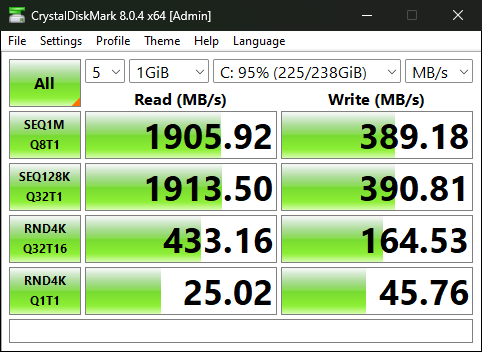
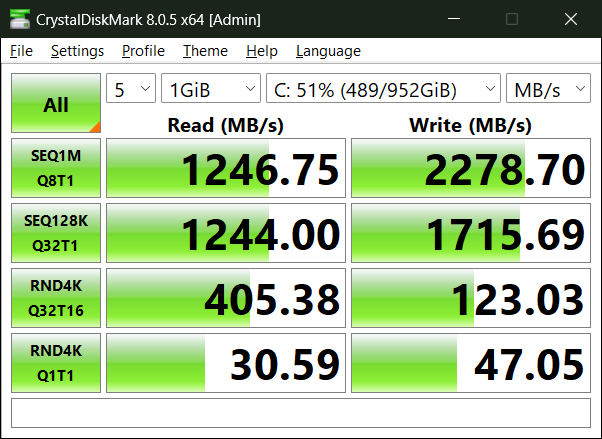
Upgraded my Surface Laptop 3 to a Micron Crucial 2400 1TB
Before:
After:
TODO cooling upgrade Fixed Surface Laptop 3 overheating issue : r/Surface (reddit.com)