Connect-PnPOnline -Url [tenant].sharepoint.com -Interactive -LaunchBrowserImport-Module Microsoft.Online.SharePoint.PowerShell -UseWindowsPowerShell$data = Invoke-MgGraphRequest -Uri "dummy" -Method GET -OutputType HttpResponseMessage
$data.RequestMessage.Headers.Authorization.ParameterNuGet
Install-Package doesn’t handle dependencies
Add-Type -Path can load DLLs though, if the method signatures are supported by PowerShell
Import-Package is lesser-known and very useful
SQLite
Import-Package Microsoft.Data.Sqlite -Verbose
$client = New-Object Microsoft.Data.Sqlite.SqliteConnection -ArgumentList "Data Source=db.sqlite" # ::new() fails
$client.Open()

$cmd = $client.CreateCommand()
$cmd.CommandText = "CREATE TABLE test (foo TEXT)"
$cmd.ExecuteNonQuery()
$cmd.Dispose()

$cmd.CommandText = "INSERT INTO test (foo) VALUES ('bar')"
$cmd.ExecuteNonQuery()
$cmd.Dispose()

$cmd.CommandText = "SELECT * FROM test"
$reader = $cmd.ExecuteReader()
while ($reader.Read()) {
	Write-Host $reader.GetString(0)
}

# $client.Close() isn't enough to unlock the db
Interop
TODO lisp https://old.reddit.com/r/PowerShell/comments/1gfe46a/craziest_thing_ever_done_with_powershell/lujalf3/?context=3
Signing
At work we had a code signing cert expiring soon, so I wanted to start dual signing binaries/scripts and give users a chance to migrate their app control rules. But I couldn’t find docs for PowerShell dual signing anywhere.
The tools I could find just overwrote the signature, rather than appending, so time to dig into the format.
Signatures are PKCS#7 appended as base64 inside well-known comment formats. Windows uses Subject Interface Packages to parse the comments, via the pwrshsip.dll provider for both version 5 and 7. I found a CryptSIPGetCaps function that returns SIP_CAP_SET with an isMultiSign bool, but the PowerShell provider doesn’t seem to implement it. Maybe I could register one and see what happens (example)? But it’s probably easier to just look at the code.
| File Extension | Comment Format |
|---|---|
| ps1 psd1 psm1 | # SIG # Begin signature block# <data># SIG # End signature block |
| ps1xml psc1 cdxml | <!-- SIG # Begin signature block --><!-- <data> --><!-- SIG # End signature block --> |
| mof | /* SIG # Begin signature block *//* <data> *//* SIG # End signature block */ |
Thanks to Ghidra (and some LLM tooling), the provider just reads the whole first comment block into pbBinary when getting a signature.
bool PsGetSignature(SIP_SUBJECTINFO *pSubjectInfo,DWORD *pdwIndex,DWORD dwIndex, DWORD *pcbSignedDataMsg,BYTE *pbSignedDataMsg)

DWORD __thiscall SipProvider::GetSignature (SipProvider *this,SIP_SUBJECTINFO *pSubjectInfo,DWORD *pdwIndex,DWORD *pcbSignedDataMsg ,
          BYTE *pbSignedDataMsg)

ulong __thiscall PsScriptFile::ExtractSignature(PsScriptFile *this,Signature **ppSignature)

PsScriptSignature::LocateAndConvertFromString(PsScriptSignature *this,wchar_t *pScriptText,uint cchScriptLength,uint dwFileFormat)
<carving base64 into pSignatureBuffer>
CryptStringToBinaryW(pSignatureBuffer,dwSignatureStringLength,CRYPT_STRING_BASE64,pbBinary,&this->pbBinaryLength,(DWORD *)0x0,&dwCryptFlags);
The signature is PKCS#7 SignedData with no validation, so surely it could have multiple SignerInfo structs? I spent half an hour with pyasn1 and didn’t get the struct quite right in the end… But while trying to verify it, I found PowerShell-OpenAuthenticode by the always-incredible Jordan Borean. ItsAdd-OpenAuthenticodeSignature would’ve saved me half an hour of scripting, and actually worked too.
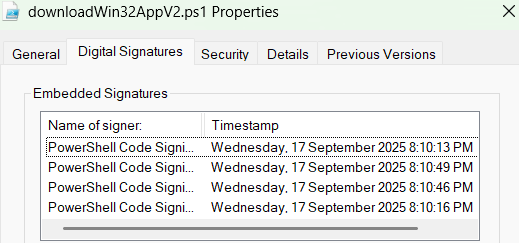
Unfortunately AppLocker doesn’t care - on my 19045.6332 test device (not EOL yet!) rules only evaluated against the first embedded signature. Event logs and Get-AppLockerFileInformation only showed the first subject too.
Stay tuned for testing with Airlock, WDAC, and maybe catalogue signatures. On a proper Win11 device 😉