The Windows Package Manager (winget) uses package metadata from external sources to install Windows apps using traditional packaging technologies.
The official user interface is a C++ CLI shipped as part of an msix bundle (Microsoft.DesktopAppInstaller), and it also exposes a COM server for other clients like PowerShell and the Intune Management Extension.
Sources
The default app metadata sources are
- msstore (https://storeedgefd.dsx.mp.microsoft.com/v9.0): Microsoft Store apps, exposed using the REST source type
- Downloads use the enterprise offline catalog (
4) as of this commit, so authentication is required
- Downloads use the enterprise offline catalog (
- winget (https://cdn.winget.microsoft.com/cache): apps from the public winget-pkgs repo, using the preindexed type. it’s an SQLite index built from committed yaml, then bundled in an msix
Some third-party sources
- https://pkgmgr-wgrest-pme.azurefd.net/api: built for Intune integration based on microsoft/winget-cli-restsource, but was eventually disabled
- https://cloudflightio.github.io/winget-pkgs: an interesting preindexed source, using GitHub for manifest storage, Actions to build the index, and Pages to expose it to users. I added support for Azure Static Web Apps in the hope of enabling authentication, but it’s not supported for preindexed sources
Preindexed
The preindexed source with Index v2 is an SQLite database bundled in a signed MSIX package. It doesn’t store installer data though, just points to manifests served from a CDN. The package version manifests (selfhost example, community example, decompressed) use a rare (unique?) MSZIP compression format (application/x-ms-zip-yaml) and shortened keys (source). Here’s a Kaitai Struct for them:
# yaml-language-server: $schema=https://raw.githubusercontent.com/kaitai-io/ksy_schema/refs/heads/master/ksy_schema.json
meta:
  id: mszyml
  endian: le
  ks-opaque-types: true
seq:
  - id: unknown
    type: u8
  - id: size_uncompressed
    type: u8
    repeat: expr
    repeat-expr: 2
  - id: size
    type: u4
  - id: signature
    contents: 'CK'
  - id: data
    size: size-2
    doc: size is sig+data
    # raw isn't supported
    # process: zlib
Authentication
winget sources can be public, require client certificate authentication, or request Entra authentication.
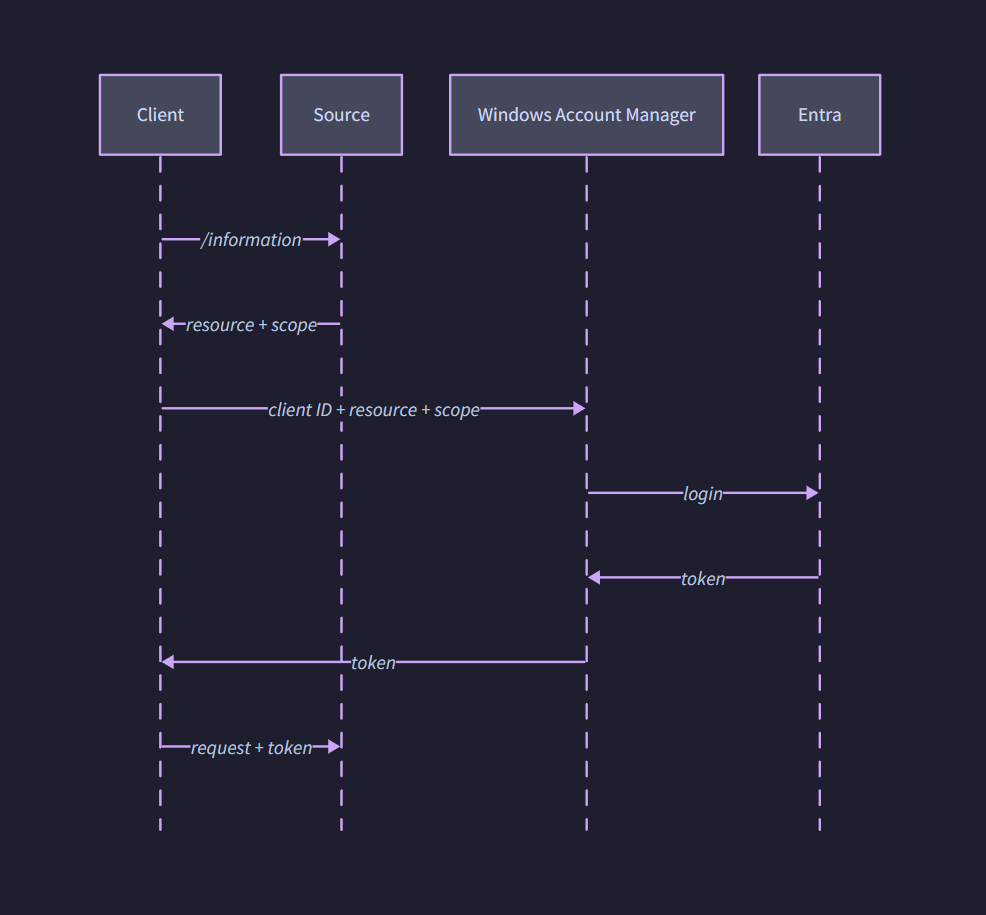
The Entra authentication flow is
- Check whether authentication is enabled using a GET request to
/information. If it’s Entra, the JSON response will also include the resource ID and scope. - Request a token from the Windows Account Manager (WAM). The request includes the source resource ID and scope, along with the App Installer client ID (
7b8ea11a-7f45-4b3a-ab51-794d5863af15). It can also include a user principal name (login hint) to prefill if the user is prompted to login, or to select if WAM has cached credentials for multiple accounts. WAM accepts a preference parameter for the login prompt toosilent: fails if no credentials are availablesilentPreferred: default, tries silent but prompts if neededinteractive: always prompts
- WAM uses its standard flow, like with other Microsoft apps. It checks its cache for an access token, or a refresh token to retrieve an access token, and if neither are available it prompts the user to login. This flow also handles consent.
- If authentication succeeds, winget sends the token to the source in the
Authorizationheader, along with a standard REST request like/manifestSearch.
Want to try out authentication? I’ve implemented a winget source with authentication, custom installer upload, and support for Amazon S3 storage, but it’s not ready to share publicly yet. If you’re interested, email me at [my first name]@tplant.com.au
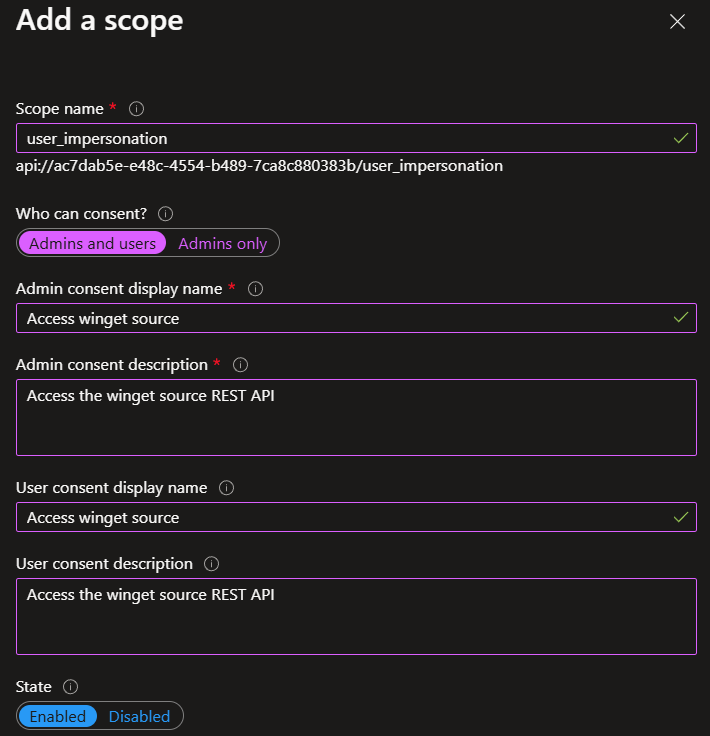
If you have your own winget source, here’s how to setup authentication. You’ll need to create an app registration with a scope, like user_impersonation
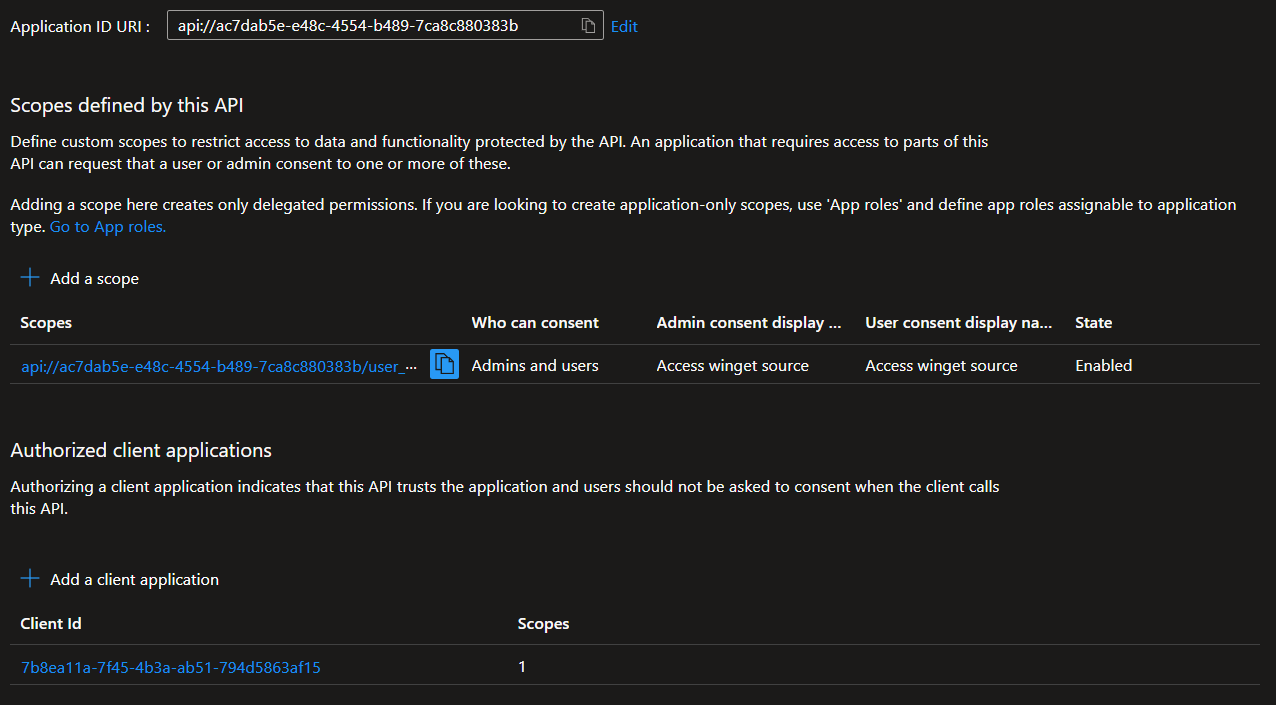
Then authorize the App Installer client ID (7b8ea11a-7f45-4b3a-ab51-794d5863af15)
Finally, configure your winget REST source to require Entra access tokens for all endpoints except /information. For /information, you’ll need to return the following JSON
{
	"Data": {
		"SourceIdentifier": "your source name",
		"ServerSupportedVersions": [
			"1.7.0"
		],
		"Authentication": {
			"AuthenticationType": "microsoftEntraId",
			"MicrosoftEntraIdAuthenticationInfo": {
				"Resource": "your resource id",
				"Scope": "your scope"
			}
		}
	}
}
Development
winget is developed with C++ and Visual Studio, so I opted for a 32 core F-series Azure VM. I later downgraded to 4 core / 16GB RAM due to poor build parallelism.
It comes with a winget DSC config for easy setup (see the README), but needs an extra command for vcpkg. Debug builds used to fail with a missing dependency of sfsclient, but seem to work now.
Build order
- AppInstallerCLIPackage
- AppInstallerCLITests
AppInstallerCLITests\Run-TestsInPackage.ps1 -Args "~[pips]" -BuildRoot $PWD\x64\Debug\ -PackageRoot $PWD\AppInstallerCLIPackage\bin\x64\Debug\ -LogTarget $PWD\AICLI-Packaged.log -ScriptWait
Downgrade a package
If the latest release has a critical bug (looking at you Docker Desktop), we can downgrade to an older version with winget install Docker.DockerDesktop --version 4.34.2 --force --custom "--disable-version-check".
--force seems necessary to bypass the check for an existing version, otherwise it’ll just print this warning and skip the install: Found an existing package already installed. Trying to upgrade the installed package....
Store
has this been quietly fixed? the product details endpoint lists LB as a supported market, at least on the default catalog. winget uses catalog 4 (enterprise) but I’m not building storelib just for this lol https://displaycatalog.mp.microsoft.com/v7.0/products/9WZDNCRFJ3PZ?fieldsTemplate=Details&market=LB&languages=en&catalogIds=1